Replace
clipboard text
ClipReplace is a macOS utility that replaces keywords inside copied text and puts the result back on the clipboard. It turns commands, code snippets, and templates stored in notes or Markdown files into something you can paste right away.
Compatible with macOS 26.0+
A small tool removes the busywork between copy and paste.
Are you editing text right before you paste it?
When you use code snippets from a notes app, commands from an operations document, or answers generated by AI, do you rewrite IDs, environment names, or tokens before you copy them?
That extra editing is minor, but it adds up. Many people end up saving multiple versions of the same command or template just to swap a few parameters.
ClipReplace sits between copy and paste. It keeps existing documents usable while removing the repetitive edits you make right before pasting.
If you place replacement keywords inside procedures or code examples, you can copy them as-is and swap server names, usernames, paths, tokens, and other values for your own environment after copying.
You do not need to rewrite the original document or save separate variants for every use case.
Keep the document intact and replace only what you need right before you use it.
How It Works
Copy - Replace - Paste
The workflow is simple. Add one replacement step to the copy-paste flow you already use.
Copy text
Copy a snippet that contains keywords from a notes app, a Markdown code block, or a text template.
Run ClipReplace
Launch it from the menu bar or use the global shortcut. ClipReplace reads the clipboard only when you trigger it and replaces all registered keywords in one pass.
Paste into your app
The replaced result goes back to the clipboard, so you can paste it immediately without re-editing it in another editor first.
Differentiation
ClipReplace is not a snippet manager.
ClipReplace works with text that is already on your clipboard. Instead of storing full templates and expanding them later, it replaces keywords inside copied text so the result is ready to use immediately.
| Aspect | ClipReplace | Snippet tools / text expanders |
|---|---|---|
| Starting point | Text you already copied | Pre-registered templates |
| Primary use | Post-processing commands, code samples, templates, and AI output | Inserting frequently used stock text or signatures |
| Setup | Register replacement keywords and values | Register full phrases or documents |
| Best fit | When you need to change only part of a text before pasting | When you insert nearly identical text every time |
Features
Built for replacement workflows
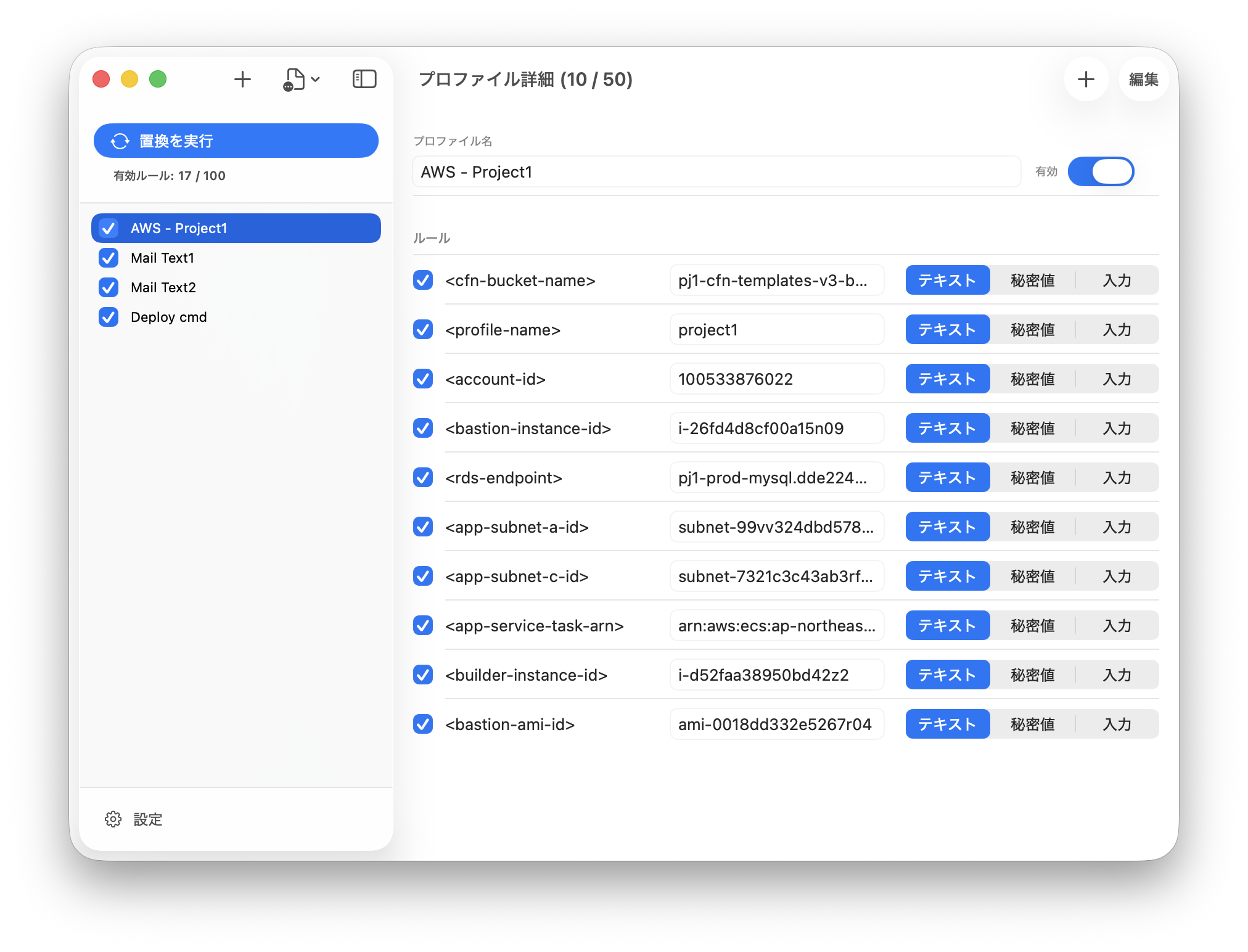
ClipReplace covers more than keyword replacement. It includes profile management, secret handling, and import/export so the whole workflow stays practical.
- Keyword replacement
- Reads clipboard text, replaces all registered keywords, and writes the result back to the clipboard.
- Global shortcut
- You can run replacement from the menu bar or use a global shortcut. Copy, trigger, and paste without leaving the keyboard.
- Per-run input values
- When some values change every time, you can enter them during the replacement flow. This is useful for MFA tokens and other short-lived values.
- Secret values
- Values can be stored as Keychain-backed secrets instead of plain text. Access to secret values requires macOS authentication.
- Protected output for secrets
- Replacement results that include secret values are treated as clipboard content for this Mac only and are cleared automatically after 90 seconds.
- Profiles and rules
- Manage multiple sets of keywords and values by use case. Profiles and individual rules can both be enabled or disabled.
- Import / export profiles
- Profiles can be exported and imported. Exporting secret values requires macOS authentication.
- Notifications
- Shows the result of each replacement run through notifications.
- Languages
- The UI supports both English and Japanese.
Free vs Full
Start with the free edition and unlock more when you need it.
ClipReplace is available for free with limits.
Move to the full edition when your replacement set grows.
Free
Free
For small replacement sets and initial evaluation.
- Up to 3 profiles
- Up to 3 rules per profile
- Up to 3 active rules at a time
- Menu bar run / global shortcut
- Secret values
- Input values at replacement time
- Import / export profiles
- Notifications / English and Japanese UI
Full
Unlocked with in-app purchase
For larger replacement sets and ongoing use.
- Up to 100 profiles
- Up to 50 rules per profile
- Up to 100 active rules at a time
- Everything in the free edition
FAQ
Frequently asked questions
The first things people usually want to know.
- How is this different from a snippet app?
- ClipReplace does not store and insert full templates. It focuses on keywords and values, so you can quickly replace placeholders inside copied notes, Markdown code blocks, and AI output.
- How are secret values handled?
- Secret values are stored in Keychain. Replacements that use secrets require macOS authentication before they run. Results that contain secrets are treated as clipboard content for this Mac only and cleared automatically after 90 seconds.
- Does it work on anything other than Mac?
- The current target platform is macOS. ClipReplace is designed as a menu bar app.
- Is the free edition practical?
- Yes, for smaller setups. For example, you can separate profiles for personal, work, and study use and keep up to three rules in each. Move to the full edition once the number of replacements grows.
- What is the difference between a profile and a rule?
- A profile is a container for rules. Disabling a profile removes all of its rules from replacement at once. Each run uses every active rule inside every active profile, so the combination of enabled items controls the final result.
Replace
clipboard text
ClipReplace is coming soon to the App Store. You’ll be able to start with the free version and unlock the full version with an in-app purchase when you need it.
ClipReplace is designed to take commands, code, and boilerplate text written in note-taking apps or Markdown files and format them into a ready-to-use format.
For example, if you embed placeholder keywords in procedure manuals or code examples, you can replace them with your own server name, username, path, token, and other details after copying the text to match your environment.
There’s no need to rewrite the original document or save it separately for each use case. The app lets you keep your documents as-is and provides a workflow where you replace only the necessary parts right before use.